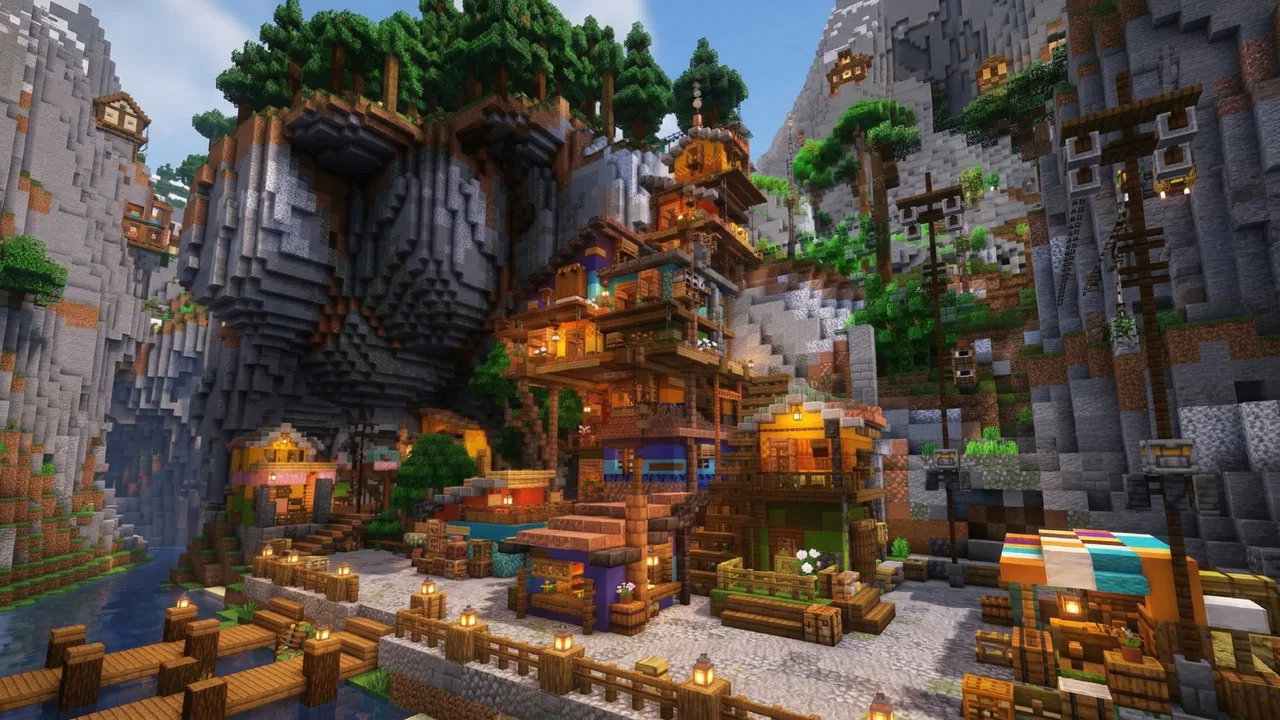
Block World - Craft City
- 4.2
- Rating
- 10.00M
- Installs
- Free
- Price
 Analysis by App-foxy
I approached Block World - Craft City as a relaxed building game rather than expecting a tightly guided adventure. That distinction matters. Its appeal is the freedom to make a place of your own, experiment with block-based construction, and return whenever you feel like shaping another part of your world. I found the experience most enjoyable when I treated it as a creative sandbox instead of chasing a fixed finish line.
It is a free simulation game from Patane Global, available for players rated Everyone. The current version is 9096, and it runs on devices using Android 5.0 or later. With an average rating of 4.5 from around 14 thousand ratings and more than 5 million installs, it has clearly reached a broad audience. Those figures suggest that the basic idea is easy to understand, but they do not automatically mean it will suit every type of player.
Building a personal routine instead of following a script
The central pleasure is the simple act of turning an empty block-based space into something recognizable. I liked beginning with a small, manageable project rather than trying to create an entire city immediately. A house, a street corner, or a compact neighborhood gives the game a useful sense of direction. Once that first area feels coherent, expanding it becomes more satisfying than placing random structures without a plan.
You May Also Like

 Blood Strike: 2.5 Anniversary
Blood Strike’s Loadouts Turn Every Drop Into a Tactical Gamble
A close look at Blood Strike’s custom loadouts: how fast access to signature weapons reshapes its battle royale rhythm, rewards preparation, and narrows the gap between fights.

 Pandora - Music & Podcasts
Pandora’s Music Is Easy to Start, but Harder to Recover
Pandora’s strength is its low-effort path from a seed to a station. Its weak spot is how much confidence it asks you to place in connection, setup, and quiet recovery.

 8 Ball Pool
 Is Built on Rivalries, Rematches, and Routine
A close look at the rivalries, rematches, shared routines, and unanswered safety questions that turn a quick pool match into a persistent mobile community.

 Samsung Music
’s Quiet Strength Is Playing What You Already Own
Its reach comes less from spectacle than from dependable access to a personal library. That simplicity is both the app’s strongest retention engine and its ceiling.

 AccuWeather: Weather Radar
AccuWeather Review: A Quick, Clear Forecast for Everyday Decisions
For everyday plans, the best forecast is the one you can understand quickly. AccuWeather makes rain timing, radar, and local conditions easy to act on, with a few trade-offs.

 Hill Climb Racing
Why Hill Climb Racing Still Turns Crashes Into One More Run
A tiny car, a bumpy hill and one more upgrade: Hill Climb Racing keeps resurfacing because its simple chaos makes every near-miss feel personal.
More From Our News Desk



That approach also makes the game a good fit for short sessions. If I only had a few minutes, I could focus on one wall, adjust a building outline, or improve the relationship between two nearby structures. During a longer session, I could think about the layout of a larger district. This flexibility is one of the strongest reasons to try it: the game can function as a quick creative break, but it can also absorb a longer afternoon when I am in the mood to design.
The city-building theme gives personal projects a useful frame. Instead of making isolated objects, I could think about how buildings relate to roads, open areas, and one another. Even without treating the result as a formal city-planning exercise, that mindset helps avoid a messy collection of disconnected constructions. I recommend deciding what each area is meant to be before filling it. A residential section, a central landmark, and a quieter edge of town create visual variety without requiring a complicated plan.
One practical tip is to leave breathing room around important structures. In a block-based environment, it is tempting to use every available space, but empty areas can make a finished build easier to read. A small plaza or an uncomplicated stretch between buildings can give the next project a clear place to grow. This is a subtle advantage of the format: good results often come from restraint as much as from adding more blocks.
I also found that building in stages is less frustrating than trying to perfect everything immediately. I would establish the rough shape first, then return to details once the overall proportions looked right. This workflow reduces the chance of spending too long decorating a structure that later needs to be moved. For anyone who enjoys creative apps but becomes discouraged by a blank canvas, that staged method provides a gentle starting point.
What progress feels like when creativity is the reward
Progress here is best understood through the world you create, not through the expectation of a conventional campaign. Players who need missions, character development, or a strong narrative may find the open-ended structure less motivating. I did not approach it as a game that constantly tells me what to do. Its reward is seeing a rough idea become a place that feels increasingly intentional.
That freedom has a trade-off. A sandbox can feel liberating on one day and directionless on another. When I ran out of ideas, the most useful solution was to set a small design brief for myself: make a compact neighborhood, rebuild one area with a different visual style, or connect two sections with a more logical layout. These self-imposed goals create momentum without changing the relaxed character of the game.
A realistic everyday use case would be a player taking a short break after work or school. Rather than committing to a long session, they can open the game, improve one unfinished building, and stop after completing a clearly defined task. It also works for someone who likes showing creative projects to friends or family, because a personal city gives the session a visible result. I would not recommend it to someone looking for a competitive match, a story-heavy progression system, or a game that delivers constant rewards for every minute played.
Another useful habit is to keep a mental distinction between functional construction and decoration. First I decide where the major forms belong; only afterward do I spend time on visual touches. This prevents small details from hiding larger layout problems. It is a straightforward technique, but it makes a noticeable difference in a game where the player supplies much of the structure and purpose.
Spending, pressure, and the questions worth asking
The game is free to download, which makes trying it low-risk from the starting point. However, the available information does not establish a complete picture of optional purchases, their prices, or how they may affect the building experience. I therefore would not promise that every part of the economy is generous, nor would I claim that spending is necessary. The sensible approach is to begin without assuming that payment will be required and to inspect any purchase prompt carefully before confirming it.
This is especially important for younger players. The Everyone age rating describes the intended content audience, but it does not replace sensible device-level purchase controls or supervision. If a child will use the game, I would set those protections before handing over the device. That is practical advice rather than a criticism of Patane Global: free games can still deserve careful attention whenever optional spending may appear.
I did not find a reason to treat the game as a spending contest. Its core appeal is personal construction, so the most meaningful progress should come from how thoughtfully a player uses the available creative space. Still, because purchase details are not established here, I would avoid making a firm claim about fairness beyond that distinction. Anyone choosing it mainly to avoid all monetization uncertainty should check the in-game purchase flow directly before investing significant time.
There is also a difference between pressure created by the game and pressure created by the player. An open building environment can encourage perfectionism: rebuilding the same street repeatedly, comparing a rough first attempt with polished creations, or feeling that a city is never complete. I found it healthier to keep early versions and accept imperfect areas. The ability to revise is more useful than trying to make every structure ideal on the first attempt.
How fair is it compared with familiar alternatives?
Compared with a traditional simulation game built around explicit objectives, this one places more responsibility on the player. A conventional city simulator may offer clearer systems, budgets, demands, or measurable targets. That can be better for someone who wants strategic decisions and visible consequences. Block World - Craft City is more appealing when the act of arranging and shaping a place matters more than managing a detailed model of urban life.
It also differs from construction games that focus on survival, danger, or resource gathering. If your favorite part of those games is the tension of finding materials or protecting a base, this may feel calmer and less demanding. On the other hand, that calmer approach is exactly what makes it suitable for creative sessions when I do not want combat or a complicated checklist competing for attention.
Compared with a pure drawing or design application, the block format adds spatial structure. I am not simply sketching a flat image; I am thinking about volume, placement, and how a creation reads as a small environment. That makes it a better choice for players who enjoy visual planning but want something more game-like than a blank design tool. It is not necessarily the best alternative for someone who wants fine artistic control or professional modeling precision.
The most important comparison is therefore about motivation. Choose this game if you enjoy making your own goals and seeing a world develop gradually. Choose a more structured simulation if you need objectives, management decisions, or a clear sense of failure and success. Choose a narrative game if you want characters and plot to carry the experience. The free entry point makes experimentation easy, but the open-ended design still requires the right expectations.
Small techniques that make the city feel intentional
My first concrete recommendation is to build around focal points. Give each district one feature that catches the eye, then keep nearby structures simpler. This creates hierarchy and stops the whole city from competing for attention. It is more effective than decorating every building equally, especially during an early project when the overall layout is still changing.
Second, use repetition with variation. A row of related buildings can make a neighborhood feel planned, but changing height, spacing, or front-facing details keeps it from looking copied. I would create one basic design, repeat its main idea, and then alter enough elements to suggest different owners or purposes. This saves time while preserving a sense of individuality.
Third, take a pause before expanding. When a city begins to feel crowded, adding more construction can make the result harder to understand. I found it useful to look at the existing area as a complete scene and ask what it actually needs: a landmark, a transition, an open space, or simply cleanup. That question often produces a better next step than building the biggest structure available.
A fourth tip is to use unfinished areas as deliberate future space rather than treating them as mistakes. Leaving a district partially developed gives the city room to evolve and prevents one early idea from locking the whole layout into place. This is particularly helpful for new players who are still discovering what kind of creations they enjoy making.
Finally, I would keep projects small enough to finish. A completed compact block teaches more than an enormous plan that becomes tiring halfway through. Finishing something gives a clearer sense of progress and provides a foundation for the next experiment. The game rewards patience, but it does not require every session to produce a massive city.
Who should try it, and who should skip it?
I would recommend it to players who enjoy creative freedom, visual organization, and low-pressure construction. It is also a reasonable choice for families looking for an accessible simulation-style game with an Everyone rating, provided adults handle purchase safeguards appropriately. People who like returning to the same personal project over time may get more from it than players who need a new challenge every few minutes.
I would be more cautious about recommending it to players who want deep city economics, elaborate management systems, or a story that leads them from one event to the next. The block-building premise is the point, not a disguise for a complex strategy campaign. Likewise, players who dislike making their own objectives may open it, enjoy the first few minutes, and then wonder what they are supposed to accomplish.
Device compatibility is relatively broad because the listed minimum is Android 5.0, but actual comfort can still depend on the individual phone or tablet and the scale of a player's creations. I would start with a modest project rather than assuming that a larger world will feel equally smooth on every older device. That is a practical way to judge whether the game suits your hardware without committing much time.
My trust verdict after weighing the trade-offs
Block World - Craft City works best when I view it as a personal creative space with a city theme. Its free access, accessible age rating, and broad audience make it easy to test, while the block-based format gives enough structure to turn casual building into a satisfying routine. I especially appreciate that a session can be meaningful without requiring a long commitment or a strict objective.
My reservation is not about the basic idea but about expectations. The open-ended design will not replace a full management simulator, a survival adventure, or a story-driven game. Purchase details also deserve a careful look in the app, since the available facts do not establish the full spending model. I would protect purchases on a shared device and judge the experience by what can be created without assuming that optional spending is either essential or irrelevant.
Patane Global has made a game that is easiest to enjoy when the player brings a little imagination and a simple plan. I would install it for a relaxed building session, begin with one compact district, and resist the urge to make everything enormous immediately. My strongest recommendation is to treat each build as a small design project, not a race toward a finished city. If that sounds appealing, this is a worthwhile free simulation to try; if you need constant direction or deep management, another category of game will likely serve you better.
After considering its creative strengths, its lack of guaranteed structure, and the need to review purchase prompts responsibly, my verdict is positive but specific: Block World - Craft City is a good fit for patient builders who want ownership of the experience. It earns its place as a casual block-building game because it leaves room for personal ideas, not because it promises a system-heavy challenge. Start small, build with intention, and you will have the best chance of seeing what makes it enjoyable.
FAQs for Block World - Craft City
01What is Block World - Craft City and how does it work?
Block World - Craft City is an open-world sandbox game that allows players to explore, build, and create within a pixelated 3D environment. Similar to popular crafting games, it offers tools for constructing structures, mining resources, and surviving in a vast landscape. Players can engage in both single-player and multiplayer modes, offering a versatile gaming experience.
02Is Block World - Craft City free to download and play?
Block World - Craft City is available as a free download on both Android and iOS platforms. However, the game may include in-app purchases for additional features, skins, or resources. These purchases are optional, but they can enhance the gameplay experience for those interested in expanding their creative options.
03What age group is Block World - Craft City suitable for?
Block World - Craft City is designed to be accessible to a wide audience, including children and adults. The game's pixelated graphics and creative gameplay make it particularly appealing to younger players. However, as with any online game, parental guidance is recommended for younger children, especially in multiplayer modes.
04Does Block World - Craft City require an internet connection to play?
Block World - Craft City can be played offline in single-player mode, allowing players to enjoy crafting and building without an internet connection. However, to access multiplayer features or download additional content, an internet connection is required. This makes it flexible for both offline and online play.
05How does Block World - Craft City compare to other crafting games?
Block World - Craft City offers a familiar yet distinct crafting experience, with its own unique features and style. While it shares gameplay mechanics with other popular sandbox games, it sets itself apart with specific tools, environments, and community features. Players who enjoy creative freedom will find it a worthy addition to their gaming library.
Pros
- Intuitive controls make gameplay smooth.
- Vast world with endless exploration opportunities.
- Regular updates with new features and fixes.
- Creative mode allows unlimited building potential.
- Multiplayer mode enhances social interaction.
Cons
- Graphics can be a bit basic for some users.
- Occasional in-app purchases can be annoying.
- Requires a stable internet connection.
- Ads can interrupt gameplay experience.
- Limited tutorials for beginners.

Block World - Craft City
Gallery